Automatic renewal
Overview
In order to help developers efficiently operate the micro-app payment business and simplify the development and management costs of periodic payment scenarios, we have opened the core function of automatic subscription renewal for micro-app developers to quickly integrate and use.
Flow Overview
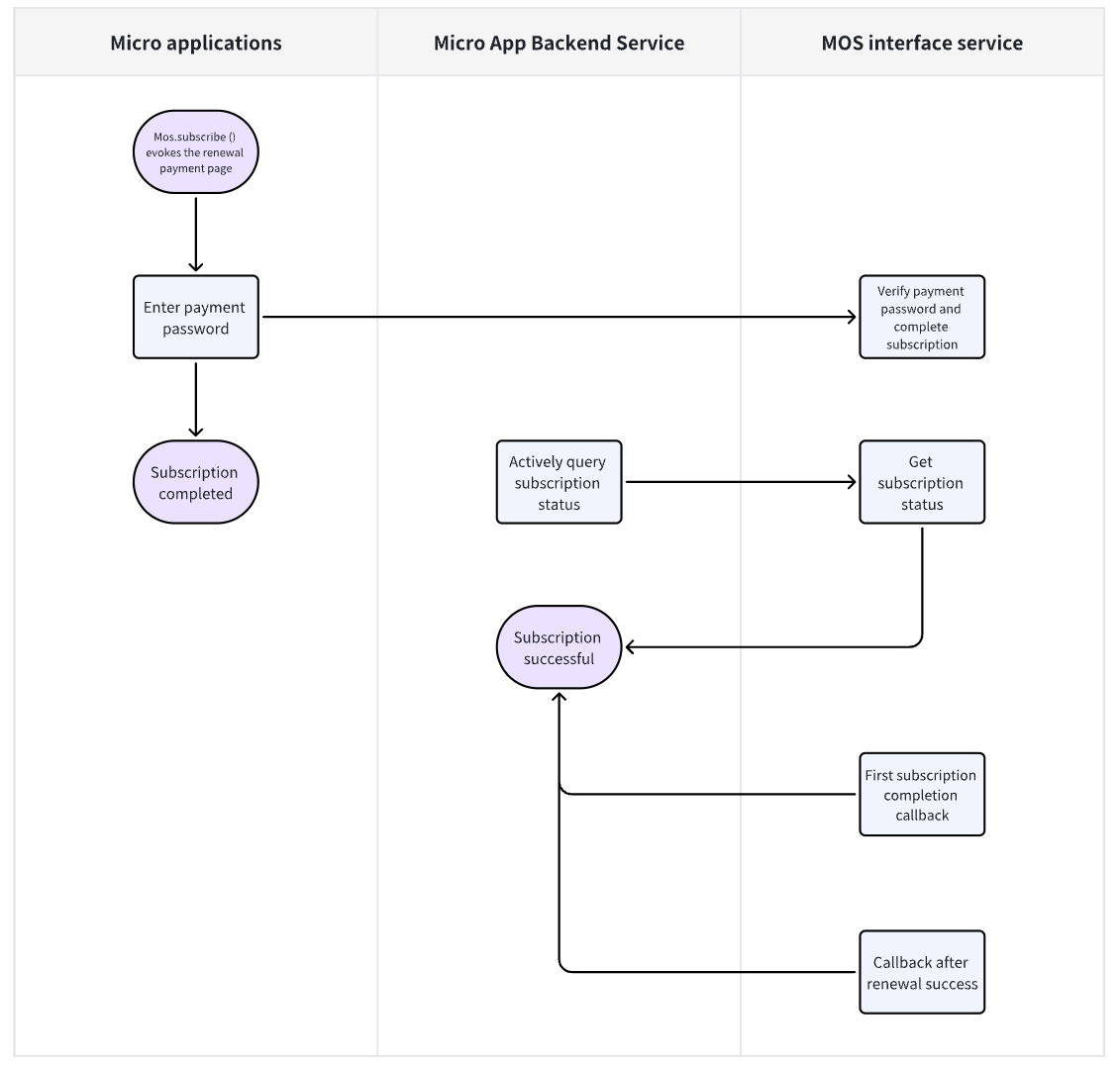
Mini-App Frontend Example Code
// Invoke payment page, payment completes after user enters payment password
const payRes = await mos.subscribe({
   subscribeAmount: "16.99",
   currency: "USD",
   billingCycle: "CONTINUOUS_MONTHLY_SUBSCRIPTION",
   billingCycleDesc: "Monthly Continuous Renewal",
   notifyUrl: "https://yourdomain.com/mos/pay/callback",
   extData: "your bisiness data",
});

const { result } = payRes;
if (result === "SUCCESS") {
  // Business logic after payment completion, such as redirecting to payment completion page
}
Mini-App Backend Service Sample Code
import cn.hutool.crypto.digest.MD5;
import com.alibaba.fastjson2.JSON;
import com.alibaba.fastjson2.JSONObject;
import com.alibaba.fastjson2.TypeReference;
import jakarta.validation.constraints.NotNull;
import lombok.AllArgsConstructor;
import lombok.Data;
import lombok.EqualsAndHashCode;
import lombok.NoArgsConstructor;
import lombok.extern.slf4j.Slf4j;
import org.springframework.beans.factory.annotation.Value;
import org.springframework.http.HttpStatus;
import org.springframework.http.ResponseEntity;
import org.springframework.http.client.SimpleClientHttpRequestFactory;
import org.springframework.stereotype.Component;
import org.springframework.web.client.RestTemplate;

import java.util.Map;
import java.util.TreeMap;

@Slf4j
@Component
public class MiniAppPayService {

   /**
    * Mos mini-app call address
    */
   @Value("${mos.mini-app.base-url}")
   private String baseUrl;
   /**
    * Mos mini-app appKey
    */
   @Value("${mos.mini-app.app-key}")
   private String appKey;
   /**
    * Mos mini-app appSecret
    */
   @Value("${mos.mini-app.app-secret}")
   private String appSecret;

    private final RestTemplate restTemplate;

    public MiniAppPayService() {
        SimpleClientHttpRequestFactory httpRequestFactory = new SimpleClientHttpRequestFactory();
        httpRequestFactory.setConnectTimeout(30000);
        httpRequestFactory.setReadTimeout(60000);
        this.restTemplate = new RestTemplate(httpRequestFactory);
    }

   /**
    * Request Mos server mini-app open interface
    *
    * @param uri          Interface URI
    * @param ao           Request parameters
    * @param clazz Response type
    * @return Response object
    */
   private <T> T call(String uri, BaseSignedAo ao, Class<T> clazz) {
      // Signature
      ao.setAppKey(this.appKey);

      Map<String, String> data = JSON.parseObject(JSON.toJSONString(ao), new TypeReference<Map<String, String>>() {
      });
      String sign = MiniAppUtil.generateSignature(data, this.appSecret);
      ao.setSign(sign);

      // Send request
      String url = this.baseUrl + uri;
      ResponseEntity<String> responseEntity = restTemplate.postForEntity(url, ao, String.class);
      if (responseEntity.getStatusCode() != HttpStatus.OK || responseEntity.getBody() == null) {
         log.error("Mini-app request exception uri={} ao={}", uri, JSON.toJSONString(ao));
         return null;
      }

      // Parse response code(int) message(String) data(T)
      JSONObject result = JSON.parseObject(responseEntity.getBody());
      if ((int)result.get("code") != 200) {
         log.error("Mini-app request exception uri={} ao={} result={}", uri, JSON.toJSONString(ao), JSON.toJSONString(result));
         return null;
      }
      return JSON.to(clazz, result.get("data"));
   }

   public CancelAutoSubscriptionVo cancelAutoSubscription(CancelAutoSubscriptionAo ao) {
      return this.call("/open-apis/mp/v1/pay/cancelAutoSubscription", ao, CancelAutoSubscriptionVo.class);
   }

   public AutoSubscriptionQueryVo autoSubscriptionQuery(AutoSubscriptionQueryAo ao) {
      return this.call("/open-apis/mp/v1/pay/autoSubscriptionQuery", ao, AutoSubscriptionQueryVo.class);
   }


    @Data
    public static class BaseSignedAo {

       /**
        * Mini-app appKey
        */
       @NotNull
       private String appKey;

       /**
        * Signature
        */
       @NotNull
       private String sign;
    }

    @Data
    @EqualsAndHashCode(callSuper = true)
    public class CancelAutoSubscriptionAo extends BaseSignedBo {

        /**
         * Random string, must be unique within the system
         */
        @NotNull
        private String nonceStr;

        /**
         * Merchant mini-app system order number
         */
        @NotNull
        private String outTradeNo;
    }

    @Data
    public class CancelAutoSubscriptionVo {

        /**
         * Merchant mini-app system order number
         */
        private String outTradeNo;
    }

   @Data
   @EqualsAndHashCode(callSuper = true)
   public class AutoSubscriptionQueryAo extends BaseSignedAo {

      /**
       * Random string, must be unique within the system
       */
      @NotNull
      private String nonceStr;

      /**
       * Merchant mini-app system order number
       */
      @NotNull
      private String outTradeNo;
   }

   @Data
   public class AutoSubscriptionQueryVo {

      /**
       * Merchant mini-app system order number
       */
      private String outTradeNo;

      /**
       * billing Cycle
       */
      private String billingCycle;

      /**
       * status
       */
      private String status;

      /**
       * start time
       */
      private Date startTime;

      /**
       * currency
       */
      private String currency;

      /**
       * subscribe amount
       */
      private BigDecimal subscribeAmount;

      /**
       * pay time
       */
      private Date payTime;

      /**
       * effective end time
       */
      private Date effectiveEndTime;
   }

   public static class MiniAppUtil {

      /**
       * Generate signature
       */
      public static String generateSignature(Map<String, String> data, String appSecret) {
         // 1. Sort the parameters alphabetically
         Map<String, String> sortedData = new TreeMap<>(data);

         // 2. Concatenate the parameters in the format key1=value1&key2=value2...
         StringBuilder sb = new StringBuilder();
         for (Map.Entry<String, String> entry : sortedData.entrySet()) {
            if ("sign".equals(entry.getKey()) || entry.getValue() == null || entry.getValue().isEmpty()) {
               // sign does not participate in signing && empty values do not participate in signing
               continue;
            }
            sb.append(entry.getKey()).append("=").append(entry.getValue().trim()).append("&");
         }
         sb.append("secret=").append(appSecret);

         // 3. Hash the concatenated string using MD5
         return new MD5().digestHex(sb.toString());
      }

   }
}
The Mini-App backend service's common module provides a generic login method, along with corresponding authentication interceptors and methods for retrieving user login information. For details, refer to the "Mini-App Backend Development" chapter.
Payment Callback
Callback Description
When a user successfully completes payment, MOS Payment will send a POST request to the pre-configured callback URL provided by the merchant, notifying the merchant of the completed payment.
Callback Processing Steps
- Merchant Receives Callback Notification MOS Payment will send a callback message via POST to the callback URL. The request body will contain notification parameters in JSON format, structured as follows:
{
    "appKey": "58e5a50ad0b243408c77622d696ff76f",
    "mcId": "1719971391999086594",
    "openid": "531d4fc958c9cbe5e5e719013b779c0b",
    "country": "KH",
    "currency": "USD",
    "totalAmount": "14.50",
    "outTradeNo": "692751186858053",
    "extData": "business ext data",
    "timeEnd": "1751265114241",
    "resultCode": "SUCCESS",
    "resultMsg": "OK",
    "sign": "bcf0b5093e67ba0a9af4b5aaa57f2998"
}
The parameters are described as follows:
| Property | Type | Required | Description |
|---|---|---|---|
| appKey | String | Yes | Mini-app appKey, can be obtained from mini-app console |
| mcId | String | Yes | Payment merchant id, applied in advance by mini-app |
| openid | String | Yes | Order user openid |
| country | String | Yes | Order country code |
| currency | String | Yes | Currency |
| totalAmount | String | Yes | Total order amount |
| outTradeNo | String | Yes | Merchant mini-app system order number |
| extData | String | Yes | External business field |
| timeEnd | String | Yes | Payment completion time, UTC timestamp |
| resultCode | String | Yes | Order status code: SUCCESS-success, FAIL-failure |
| resultMsg | String | Yes | Success or failure reason |
| sign | String | Yes | Signature for client to verify interface validity. See utility class above for signature generation method |
2. Callback Verification
Upon receiving the callback notification message, the merchant must complete signature verification of the message within 5 seconds and respond to the callback notification. Signature verification is performed on the callback notification to ensure the validity of this interface callback. For specific verification methods, refer to the aforementioned utility class.
3. Respond to Callback Notification
After signature verification, the merchant must respond with a JSON result:
Success example:
{
   "returnCode": "SUCCESS",
   "returnMsg": "OK"
}
Failure example:
{
   "returnCode": "FAIL",
   "returnMsg": "Internal server error"
}
4. MOS Payment Callback Handling Mechanism
After receiving the merchant's response, MOS Payment will perform corresponding logic processing based on the response result:
- If the merchant successfully acknowledges the callback, MOS Payment will not resend the same callback notification.
- If duplicate callback notifications are received due to network or other issues, the merchant should process and respond according to the normal business flow.
- If the merchant fails to acknowledge the callback or does not respond within 5 seconds, MOS Payment will resend the callback notification at the following intervals: 15s / 30s / 3m / 10m / 20m / 30m / 60m / 3h / 6h This will continue until either:
- MOS Payment receives a successful response from the merchant, or
- The maximum number of retries (9 times) is reached.